tn36 — ARC-AGI-3 game guide
Full spoilers for this public game. Play first if you want to discover its rules yourself.
Freely toggle switches on the right-hand panel to chain move/rotate/scale/recolor instructions onto its token, matching a target; from level 2 the left panel only plays preset demo programs.
You flip switches to build a short program of moves, turns, resizes and recolors, then run it on a yellow block to land it exactly in its target outline. Every click shortens the blue bar at the top, and you lose when it runs out.
Controls
- ACTION6: Flip a switch on the right panel, press the blue run button, or pick a demo tab under the left panel
Level by level
Level 1
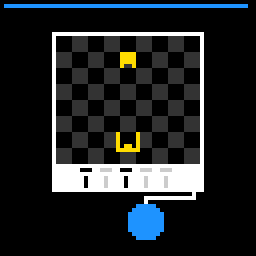
- Click is the only action. What it does depends on where you click: a switch, the blue run button, or (from level 2) a demo tab. Clicking anywhere else does nothing but still costs a click.
- Switches sit in columns under the board. Click one to flip it: black is on, light gray is off.
- Clicking the blue circle runs the program. The columns play left to right, one per frame, and the column being played lights up blue behind its switches. You can't click anything until the run ends. Every run starts from the block's starting spot, not from where the last run left it.
- Win by running a program that leaves the yellow block sitting exactly inside the yellow target outline, with the same size, the same rotation and the same color as the target, all at once. Only the right-hand panel counts.
- The block is a yellow square with a two-cell notch cut into one side, so you can see which way it is turned. The target is a yellow U-shaped outline with a small bump in the middle; the bump shows where the notch has to go.
- Each column is one instruction. Count a column's switches from the top as 1, 2, 4, 8, 16 and 32 and add up the ones that are on; that total picks the instruction. On level 1 each column only has the 1 and 2 switches.
- Level 1 instructions: 0 (both off) = do nothing, 1 = move left one square, 2 = move right one square, 3 = move down one square. One square is one square of the checkerboard.
- Nothing stops the block at the edge of the checkerboard: a move can slide it off the board and under the black frame.
- The blue bar along the top edge is your click budget. Every click, including clicks on nothing, moves it one step off to the left. On levels 1 to 5 you get 60 clicks and the 61st loses; on levels 6 and 7 it only moves every second click, so you get 121 clicks and the 122nd loses. If the click that empties the bar is a run that wins, the win still counts.
- A run that doesn't match the target sends the block straight back to its starting spot, size, rotation and color when it ends.
- A winning run flashes the block and the target green for a frame, then the next level loads.
- The run button flashes light blue for a frame when you click it.
- RESET restarts the current level: block, switches and the blue bar all go back to how the level started. There is no undo; to un-flip a switch you click it again, which costs a click.
Level 2
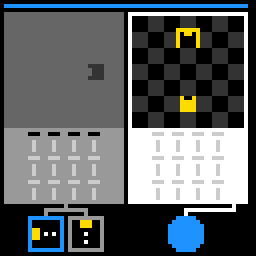
- Square tabs under the left panel. Clicking one turns it blue (the others go gray), loads that tab's preset program into the left switches, puts the gray block at that tab's starting spot, and plays the program right away. The block stays where the demo leaves it. Clicking the same tab again replays it. Each tab carries a small picture of what its program does: a yellow block trailing white dots for a move, a big or a tiny yellow square for grow or shrink, a yellow diamond for a turn, a purple square for recolor.
- A second panel on the left with a gray block on a plain gray board. Its switches can't be flipped; clicking them only costs a click. It has no target and nothing you do there counts toward winning.
- Columns now have six switches, so the instructions above 3 (up, two-square jumps, turns, size and color) become possible. Level 2 has four columns.
- More move instructions: 33 = up one square, 34 = also left one square, 10 or 11 = right two squares, 12 or 13 = left two squares.
- Turn instructions: 5 = quarter turn clockwise, 6 or 16 = quarter turn counterclockwise, 7 = half turn.
- Size instructions: 8 = grow one size, 9 = shrink one size. The block grows out to the right and down from its top-left corner, and it never shrinks below normal size.
- Color instructions: 14 = turn blue, 15 = turn red, 63 (all six switches on) = turn purple. Every number not listed in these bullets does nothing.
Level 3
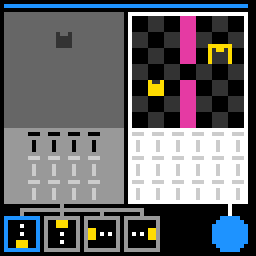
- Six columns on the right panel, so a program is up to six instructions long.
- Pink walls on the board. A one-square move or a grow that would overlap a wall doesn't happen, and the program carries on with the next column. A two-square jump only checks where it lands, so it goes straight over a one-square wall.
Level 4
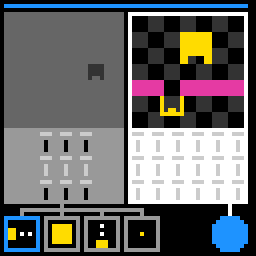
- The block starts bigger than the target, so size now has to be fixed as well as position.
Level 5
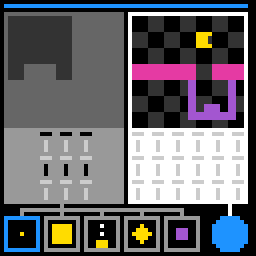
- The target is purple and twice normal size, and the block starts turned a different way, so this level needs turning, growing and recoloring in one program. One of the demo tabs shows a block turning purple.
Level 6
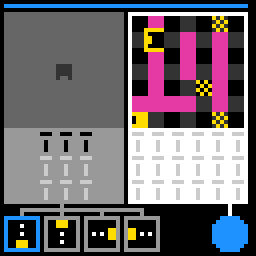
- Yellow checkered squares are save points. If a run ends with the block, at normal size, on one of them, that spot becomes the block's new start (along with its current rotation and color), and every later run begins there. The square disappears while the block covers it. A grown block doesn't save. RESET puts the start back.
- The blue bar drains at half speed on levels 6 and 7: one step every second click.
Level 7
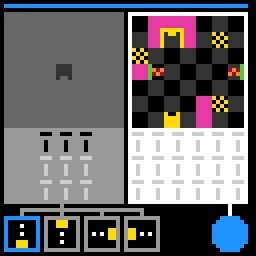
- There is also a hidden save square under the block's starting spot. It shows up once the block moves off it, so you can move the start back there.
- Two beam emitters: small boxes with a green edge and an orange and dark red checkered middle, one on each side of the board. Touching an emitter box breaks the block. After the third instruction of every run, both shoot out an orange and dark red beam three and a half squares long; a block in the beam, or moving into it, breaks.
- A broken block shows as an orange and dark red checkered block for one frame and then disappears. It ignores the rest of the program, the run fails, and the block comes back at its start. The beams pull back in when a failed run ends.
Mechanics
The right-hand panel is the one that counts: a yellow block with a notch, a yellow target outline, a row of switch columns and a blue run button. Each column of switches adds up to one number, and each number is a fixed instruction (move one square, jump two squares, turn, grow or shrink, recolor, or nothing). Pressing run plays the columns left to right, one per frame. You win when the run ends with the block in the target at the same spot, size, rotation and color. A run that misses sends the block back to its start. From level 2 a left-hand panel appears with tabs underneath; clicking a tab plays a preset demo program on a gray block so you can work out what the instructions do, but its switches can't be clicked. From level 3 there are six columns and pink walls that stop moves (a two-square jump goes straight over them). Level 6 adds yellow checkered save squares that move the start, and level 7 adds beams that shoot out after the third instruction of every run and break the block. Every click spends one unit of the blue bar at the top: 60 clicks on levels 1-5, 121 on levels 6-7, and the next click after that is a loss.
Notes and caveats
Added 2026-09-11 when the informal-name registry was extended from the original 6 games to the full 25-game public demo set. No replay video or hints exist yet for this game -- only the level screenshots rendered from their own game source on 2026-09-12 and the two replay links ARC Prize published with the GPT-6 Astra results. Corrected 2026-09-12 after an adversarially-verified direct source read: the panels' clickable/locked roles were backwards, the single-shared-number framing was wrong, and the final level's freeze hazard was missing.
All official game guides · The Slippery Seven · Human and AI results