ft09 — ARC-AGI-3 game guide
Full spoilers for this public game. Play first if you want to discover its rules yourself.
Click tiles to cycle their colors until every small marker on the board is satisfied, within a fixed click budget per level.
The board is a grid of colored tiles with a few small marker squares mixed in. Each marker has a colored center and a border: a white border cell means the tile on that side must be the center color, a gray one means it must not be. Clicking a tile steps it to the next color. Satisfy every marker at once before your tile clicks run out.
Controls
- ACTION6: Click to change tile/color
Level by level
Level 1
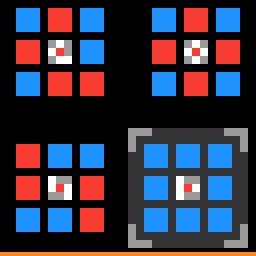
- Click a tile (a solid 3x3 colored square) to move it to the next color in the level's color list. After the last color it wraps back to the first. Each tile click costs 1 from the budget.
- Clicking anything that is not a tile (a marker, a gap, the background, the color swatches) does nothing and costs nothing.
- Clicking is the only action. There is no undo. RESET restarts the level with a full budget.
- Markers are small 3x3 squares set in among the tiles. The center color is the target. Each of the eight border cells points at the neighboring tile on that side, diagonals included.
- A white border cell means the tile on that side must be the target color. A gray border cell means that tile must be any other color. Two markers can share a tile, and then both rules apply to it.
- The level is won the moment every marker is satisfied at once, and the next level loads straight away. The click that solves it does not use up budget.
- The bottom row is the click bar: orange for what is left, yellow for what you have spent. Budgets are 32, 32, 96, 96, 128 and 128 tile clicks, refilled at each new level. Hit zero before the board is solved and you lose.
- On level 1, clicking outside the tiles (anywhere but a tile or the marker) makes the gray corner brackets around the real puzzle flash white twice, pointing you at it. It costs nothing.
- Level 1 is a lesson: three solved example boards, each a ring of tiles around a marker, and the real puzzle in the lower right inside gray corner brackets. It uses blue and red only.
Level 2
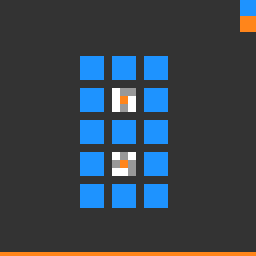
- More than one marker on a board, so tiles between two markers have to suit both.
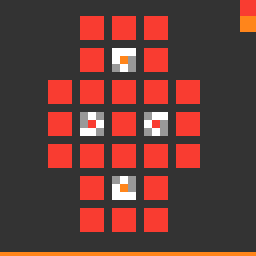
- Small color swatches at the top right list the level's colors in click order. The first swatch is the color every tile starts in.
Level 3
Level 4
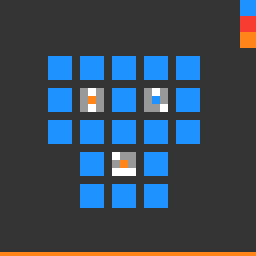
- Three colors in the cycle (blue, red, orange), so a tile can take two clicks to reach the color you want.
Level 5
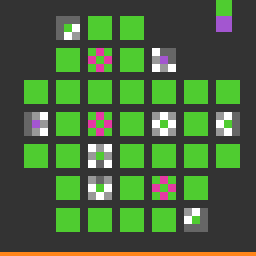
- Dark gray border cells on a marker: there is no tile on that side, so there is nothing to check there.
- Tiles with pink dots on their edges. Clicking one recolors it and every neighboring tile a pink dot points at, each one step along the color list. Level 5 has three of these, each with four dots (up, down, left, right).
Level 6
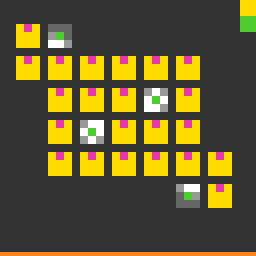
- Every tile on level 6 has one pink dot on its top edge, so each click recolors that tile and the tile directly above it (if there is one).
Mechanics
Every level is a grid of 3x3 tiles with a few 3x3 markers set in among them. A marker's center color is its target, and each of its eight border cells points at the tile on that side, diagonals included: white means that tile must be the target color, gray means it must be any other color, and dark gray (from level 5) means there is no tile on that side. Clicking a tile moves it to the next color in the level's list and wraps around; that list is shown as small swatches at the top right from level 2, and every tile starts on the first one. The level ends the moment every marker is satisfied. Only clicks on tiles cost anything: 32 on levels 1 and 2, 96 on levels 3 and 4, 128 on levels 5 and 6, shown as an orange bar along the bottom that gives way to yellow as you spend it. Run out before the board is solved and you lose. Level 1 shows three solved example boards and puts the real one in gray corner brackets that flash if you click outside the tiles. Level 4 is the only level with three colors in the cycle. Level 5 adds tiles with pink dots on their edges: clicking one recolors it and every neighbor a pink dot points at. On level 6 every tile has a single pink dot on its top edge, so a click recolors that tile and the tile above it. There is no undo; RESET restarts the level.
Notes and caveats
Corrected 2026-09-12 after a direct, adversarially-verified source read: the original "dominant color" precedence framing had no code behind it at all. The real mechanic is independent, all-must-hold color markers scattered around the board, a per-level click budget that can lose the game, and a tile type that recolors several neighbors per click.
All official game guides · The Slippery Seven · Human and AI results