dc22 — ARC-AGI-3 game guide
Full spoilers for this public game. Play first if you want to discover its rules yourself.
Walk a small green square to the yellow goal square while pressing panel buttons that swing, flip, extend and slide pieces of floor into place. From level 5 you also drive a claw that carries a piece of floor for you. A press that pulls the floor out from under you costs 20 steps, and if that empties your budget the game is over.
You move the green square with the arrow keys, but only onto floor, and most of the path is missing. Buttons on the black panel to the right change the pieces of floor that match them: swinging bars, tiles that go solid or checkered, gaps that close, slabs that slide. Build the path, walk it to the yellow square, and do not press a button that removes the floor you are standing on: that costs 20 steps and is undone.
Controls
- ACTION1: Move Up
- ACTION2: Move Down
- ACTION3: Move Left
- ACTION4: Move Right
- ACTION6: Press a panel button
Level by level
Level 1
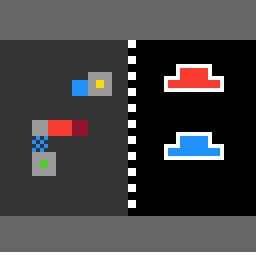
- Arrow keys move the small green square 2 cells. You can only move onto floor: gray tiles, solid colored pieces, pads, tokens. A move into a wall or off the floor does nothing. Every arrow press costs 1 step, even one that goes nowhere.
- Click a button on the black panel on the right to use it. A button press costs 2 steps. Clicking on nothing (or on a hidden button) costs 1 step and does nothing.
- There is no undo. RESET restarts the current level with a full budget.
- Step onto the small yellow square. The next level loads the moment the green square lands exactly on it, even if that move spends your last step.
- Each button changes every piece linked to it at once. On levels 1-3 that simply means every piece of the button's color.
- Red button (level 1): the red bar with a dark red end block swings a quarter turn around that end block, between pointing left and pointing up.
- Blue button: blue tiles flip between solid blue, which is floor, and a blue checkered pattern, which you cannot stand on and which can block you.
- If a click leaves the green square with no floor under it, the square fades out, the screen closes to black in a shrinking circle around it, and then the click is undone and 20 steps are taken from your budget. If that empties the budget, you lose. This goes for any click, claw moves included.
- The bottom row of the screen is the step bar: it starts white and turns dark gray from the left as you spend. Budgets are 128, 192, 192, 192, 512 and 1024 steps for levels 1 to 6. Running out on a move or a press loses the game.
- Level 1 draws a white outline around both panel buttons as a hint. The outlines disappear on your first button press.
Level 2
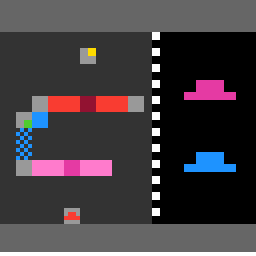
- Long red and pink bars (20 cells) with a center block swing a quarter turn around that center, between lying flat and standing upright.
- Hidden buttons: a panel button can be missing at the start. Walk over the small token of its color on the board and the button appears. Level 2 hides red, level 3 and level 5 hide purple.
Level 3
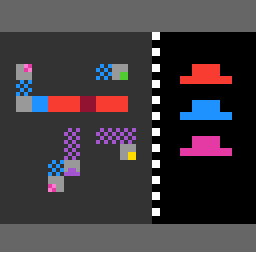
- Purple pieces flip between solid purple (floor) and purple checkered (not floor), the same as the blue tiles.
- Pink pads: two small pink and light pink checkered squares. Stand exactly on one and press the pink button, and you jump to the other pad. Pressing pink while not on a pad does not move you.
Level 4
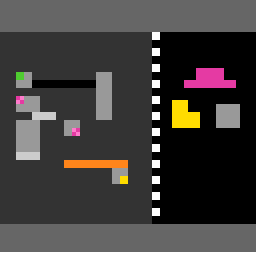
- Gray square button: closes a black gap from both ends, 2 cells per end per press, in light gray. On the fourth press the gap is fully bridged and turns orange; the next presses open it again, an 8-press cycle. Two gaps on a level can be out of step with each other.
- Yellow L-shaped button: a short light gray slab slides 2 cells along its strip per press, turns orange at the far end, and on the next press jumps back to the start, a 6-press cycle.
Level 5
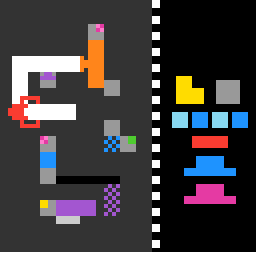
- A red claw sits on a white track on the board, driven by panel buttons: light blue squares for left and right, blue squares for up and down, a red bar to grab. It moves 4 cells per press, up and down the left side of the track and left and right along its top and bottom rows. A good move costs 1 step.
- Grab with the claw over the orange pillar and the claw closes on it. The pillar then moves with the claw, and it is floor you can stand on. There is no release: pressing grab again costs a step and does nothing.
- A claw move off the track costs 1 step, and the claw nudges that way and snaps back. Grabbing with nothing under the claw is free, and the claw just flickers open and shut.
Level 6
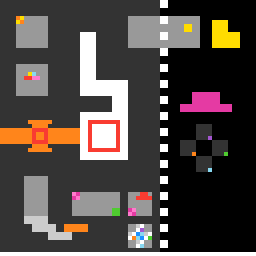
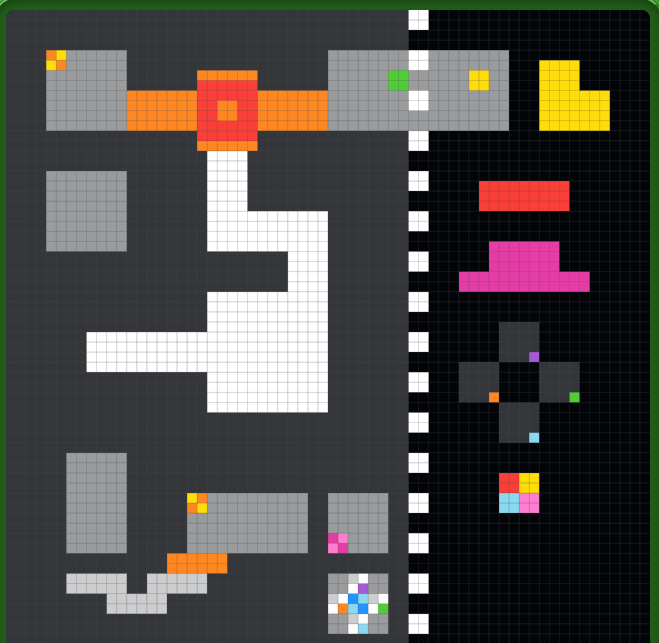
- The yellow goal is not on the open board: it sits in a notch cut into the top of the panel, reached along gray tiles.
- The claw becomes a red square outline that can only move onto the white track tiles, 4 cells per press. Its grab picks up the orange bridge (an orange bar with a red-outlined center) and carries it, and the pink button still swings that bridge while it is carried.
- The claw's direction buttons only show while you stand on the matching tile of a small cross of tiles: each tile has a colored dot (orange left, purple up, green right, light blue down). Step off and the button disappears. On this level those buttons are panel buttons, so a good claw move costs 2 steps.
- The claw's grab button appears after you walk over the red token, and a multicolor token reveals a four-color square button. That button recolors one pad pink, red, yellow, blue in turn. A pad sends you to the other pad of the same color, so recoloring it picks where it leads.
Mechanics
You control the green 2x2 square directly: each arrow press moves it 2 cells, but only onto floor (gray tiles, solid colored pieces, pads, tokens), and every press costs 1 step even when you cannot move. Reach the yellow 2x2 square and the next level loads at once. The black panel on the right holds the buttons, and clicking one costs 2 steps; clicking on nothing costs 1. On levels 1-3 each colored button changes every piece of its color: red and pink bars swing a quarter turn around their center block, and blue and purple tiles flip between solid (floor) and checkered (not floor). Level 1 outlines both buttons in white until your first press. Level 2 hides the red button until you walk over a small red token; level 3 does the same for purple. Level 3 adds pink pads: stand exactly on one and press pink, and you jump to the other pad. Level 4 adds a gray square button that closes a black gap 2 cells from each end per press (orange when closed, then it opens again) and a yellow L-shaped button that slides a light gray slab 2 cells along its track. Level 5 adds a red claw on a white track, driven by five panel buttons: it moves 4 cells a press up the left side or along the top or bottom row, a move off the track costs 1 step and just nudges it, and the red bar grabs the orange pillar at the end of the top row, which you can then carry and stand on. There is no release, and a grab with nothing under the claw is free. Level 6 swaps in a square claw that can only move onto the white track tiles and grabs the orange rotating bridge; its direction buttons only show while you stand on the matching tile of a small cross of tiles, its grab button appears after a red token, and a multicolor token reveals a button that recolors one pad pink, red, yellow, blue in turn, so it links to a different pad. After any click, if the green square has no floor under it, the square fades, the screen closes to black around it, the click is undone, and you are charged 20 steps; if that takes the budget to zero, you lose. Budgets are 128, 192, 192, 192, 512 and 1024 steps, shown as the bottom row turning dark gray from the left. There is no undo button; RESET restarts the level.
Notes and caveats
Added 2026-09-11 when the informal-name registry was extended from the original 6 games to the full 25-game public demo set. No replay video or hints exist yet for this game -- only the level screenshots rendered from their own game source on 2026-09-12 and the two replay links ARC Prize published with the GPT-6 Astra results. Corrected 2026-09-12: the original "adversarially verified" pass still missed that a wrong press can end the game outright, caught by a second, independent re-verification. Level 6 screenshot replaced 2026-09-15 with a mid-play capture from Boss's own attempt; the original auto-rendered opening frame is gone (git history has it if it's ever needed back). Restored 2026-09-18: the engine render is lvl6.png again and Boss's capture sits beside it as lvl6-human.png. LIVE PLAY, LEVEL 6 (2026-09-15): Boss sent two console screenshots seconds apart, same level, and comparing them shows the reshape mechanic actually firing: the right-side panel (the fixed column of pressable shapes -- a red bar, a magenta ledge, a grey cross with four colored dots, a yellow L-bracket, a small 2x2 four-color square, and a larger multicolor cluster) is pixel-identical in both, confirming it is a static button deck, not board state. The left play-field is not: an orange bar with a red-centered tile -- read here as the claw-and-track piece already described in mechanicsExplanation -- sits isolated mid-board in the first frame, and in the second frame the same piece has relocated to bridge the two top grey platforms, with the white walkable path reshaped to originate from that new junction. This is inferred from pixels only (no source read to confirm it is literally the claw/track and not some other reshaped element), but it is the first time this file has an actual before/after pair showing a single panel press change the board, rather than a static single-level screenshot -- worth confirming against source or against Boss directly before stating as fact in mechanicsExplanation. CONFIRMED IN SOURCE 2026-09-16 (Claude Opus 5): the orange bar with the red-outlined center is the level 6 orange bridge, not the claw. The pink button swings it a quarter turn, and the square claw can grab it and carry it along the white track tiles, which is what moves it to a new spot (checked in the engine). The panel is also not a fully static deck on level 6: the claw direction buttons only show while you stand on the matching tile of the small cross of tiles, and the grab and four-color buttons appear only after you walk over their tokens.
All official game guides · The Slippery Seven · Human and AI results